
A localized free shipping bar needs three things to agree: the shopper's market, the displayed currency, and the message language. If any part is wrong, the banner can create more confusion than it solves.
Can Shopify do this natively?
Shopify can localize storefront experiences through Markets, currencies, and languages. But a free shipping bar is often a theme block or app message. That message needs its own localization rules if it includes a threshold amount or shopper-facing copy.
The common problem is a mixed experience: product prices show in the shopper's currency, while the banner still says "Free shipping over $75" in the shop currency and default language.
Manual workaround
List every storefront language
Write approved banner copy for each published language.
Map each market currency
Calculate the threshold display for each market currency you want shoppers to see.
Add theme logic or separate blocks
Use storefront conditions to swap copy and amounts based on country, language, or market.
Retest after every change
Open the storefront in each market and language after price, currency, or shipping changes.
Where the workaround breaks
A hardcoded converted threshold can become stale when exchange rates or pricing strategy changes.
The language can update while the amount stays in shop currency, or the reverse.
Manual localization is manageable for one market. It gets fragile when you support several currencies, publish several languages, or run different free shipping offers in different markets.
Better way with Lioriq - Free Shipping A/B
Lioriq lets merchants keep thresholds in shop currency while displaying shopper-facing amounts in the active Shopify Market currency when shopper-currency display is enabled. The complete product also supports localized message versions for storefront languages or specific market contexts.
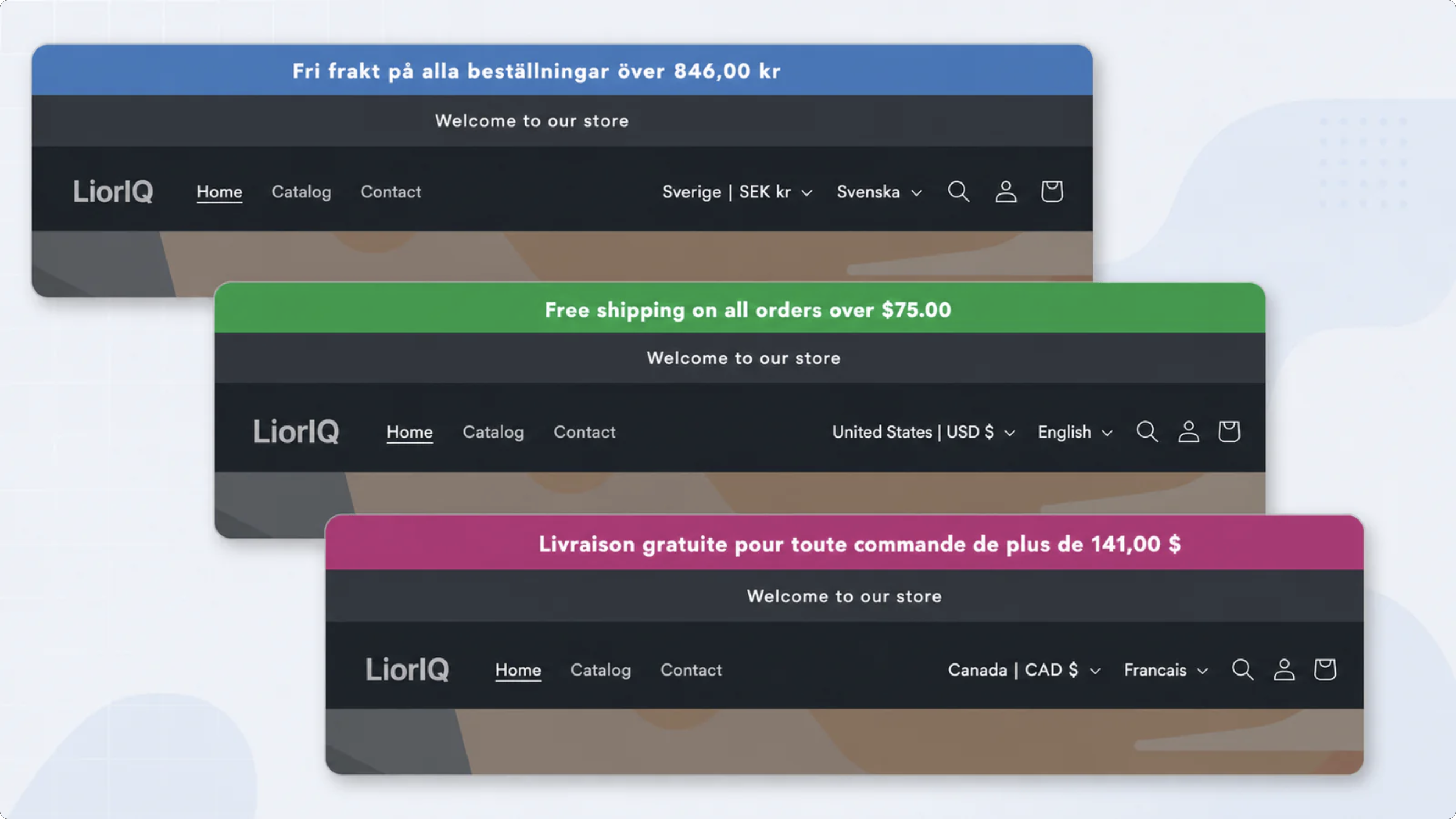
Make the free shipping message match the storefront
Use market-aware currency display and localized copy instead of a one-size-fits-all banner.
Install on Shopify App StoreWhen this setup is useful
Your prices adapt by country
Keep threshold amounts in the same currency context shoppers use for products.
Your copy changes by language
Show free shipping text in the shopper's storefront language instead of one default message.
You test different thresholds by market
Keep each threshold, amount display, and message copy aligned during a test.
How to set it up
- Confirm which storefront languages and Shopify Markets are active.
- Decide whether the banner should use shop currency or shopper currency.
- Create localized message overrides for important markets or languages.
- Preview the banner in each shopper context before publishing.
- If shopper currency cannot be rendered safely, hide the affected message instead of showing the wrong amount.
FAQ
Why is static currency a problem in a Shopify free shipping bar?
If product prices show in a shopper's local currency but the banner threshold stays in shop currency, shoppers may misunderstand how much they need to spend.
Can a Shopify free shipping message be translated?
Yes, but the message needs a localization workflow. Lioriq supports localized message versions on the complete product.
Should I show a banner if localized money cannot be resolved?
No. Showing no message is safer than showing a free shipping threshold in the wrong currency.
Can thresholds be edited in shop currency but displayed in shopper currency?
Yes. Lioriq supports editing thresholds in shop currency and rendering shopper-facing amounts in the active Shopify Market currency when shopper-currency display is enabled.