
Shopify can test shipping rates technically, but a real threshold test needs traffic assignment, consistent storefront messaging, order attribution, and reporting that accounts for shipping cost.
Use this guide for how to test shipping thresholds and run an A/B test of a free shipping threshold. First, screen threshold A and B with the profit calculator, then test the candidates with real shoppers.
Can Shopify do this natively?
Shopify lets you configure and verify shipping rates, markets, and discounts. That is enough to test whether a rate appears correctly, but it is not the same as an A/B test. A useful threshold test must show different shoppers different thresholds, remember which threshold each shopper saw, and connect completed orders back to the right version.
Without that attribution, the result is usually a before-and-after comparison. That can be misleading if a sale, season, traffic source, or campaign changed while the threshold changed.
Manual workaround
Pick your current threshold
Use the threshold shoppers already know, such as free shipping over $75.
Run an alternative later
Change the store to a second threshold, such as $95, and compare the next period with the first.
Export orders
Pull order count, revenue, average order value, shipping cost, and margin data for each period.
Adjust for context
Remove dates with major promotions, stockouts, unusual traffic, or shipping policy changes.
Where the workaround breaks
A Monday-to-Sunday comparison can be affected by payday, campaigns, weather, inventory, or ad spend.
A lower threshold can lift conversion while reducing profit because the merchant pays more shipping.
Manual tests are most useful for rough directional checks. They are weaker when traffic is volatile, when markets behave differently, or when the store wants to know whether a threshold added profit after shipping cost.
Better way with Lioriq - Free Shipping A/B
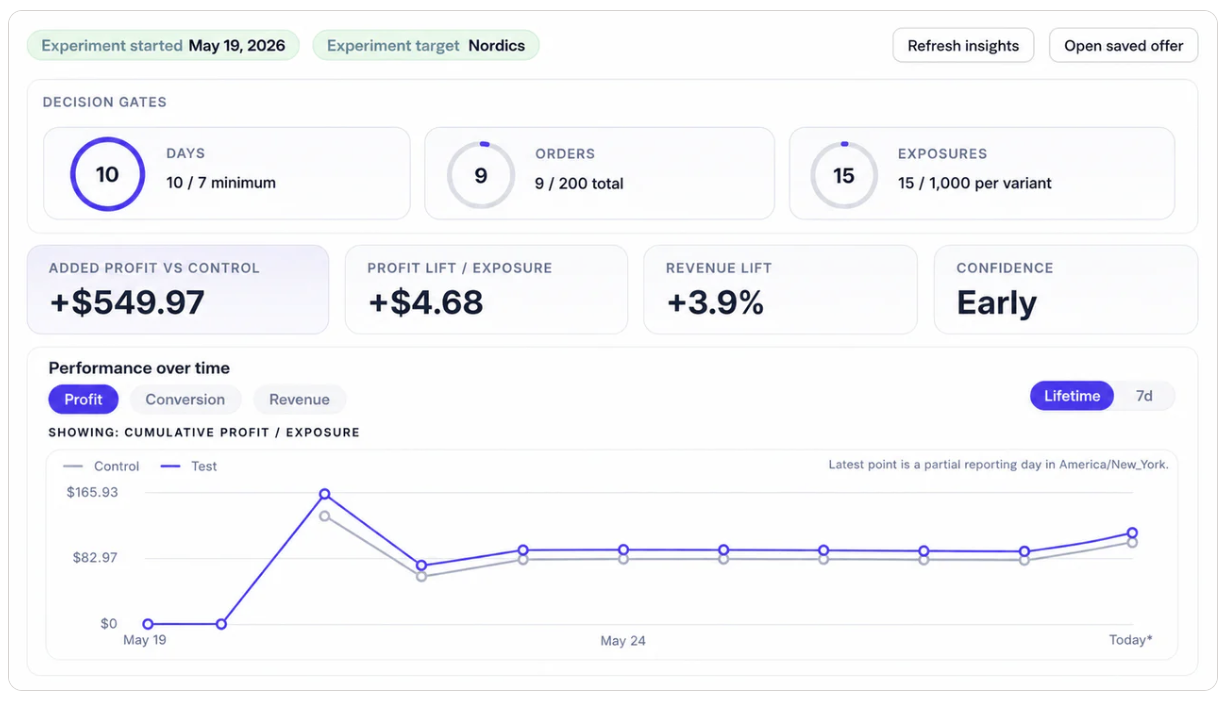
Lioriq lets merchants compare a current threshold with one alternative. The app handles storefront messaging, assignment, exposure tracking, order attribution, and reporting for profit, revenue, completed orders, and conversion.
Use a dedicated threshold test instead of a guess
Start with your live offer, choose one alternative threshold, and review the result before changing your long-term shipping policy.
Install on Shopify App StoreWhen this setup is useful
You pay too much shipping
Test a higher threshold to see whether shoppers still order and whether profit improves.
Orders slow down near checkout
Test whether a more reachable threshold helps more shoppers complete checkout.
Markets have different shipping economics
Do not assume the same threshold works equally well in every country or currency.
How to set it up
- Create or confirm your current free shipping offer.
- Open Optimize and review its recommended alternative as an editable starting point, not a prediction.
- Keep the banner copy and placement steady where possible.
- Run one active test at a time.
- Wait for at least 7 full days, 1,000 exposures per side, and 200 confidently matched orders in total.
- Review profit per exposure first, then revenue, conversion, confidence, and traffic quality.
- Treat the early leader as directional until every readiness check passes.
- Confirm the result before updating or pausing the live offer.
After the decision, keep the selected offer live and continue operating it. Retest when shipping costs, margins, Markets, shopper mix, or the threshold strategy changes materially.
FAQ
Can Shopify A/B test free shipping thresholds natively?
Shopify can create shipping rates and discounts, but most merchants still need an app to split traffic between two thresholds and report profit, revenue, and conversion by variant.
What should I compare in a first threshold test?
Compare your current threshold with one alternative. For example, test $75 against $95 instead of changing threshold, banner copy, and market targeting at the same time.
Should I choose the threshold with the most revenue?
Not automatically. A threshold can increase revenue while reducing profit if the store pays too much shipping. Use profit as the main review signal.
Can I test free shipping against no free shipping?
Yes, that is useful when you want to know whether offering free shipping adds enough value to cover its cost. See the offer-vs-no-offer use case below.